Using Remark Office OMR 10 or Remark Classic OMR 6 or earlier? Upcoming security changes may affect older versions. Learn More.
}
In order to maintain compliance with the modern cybersecurity standards that security-conscious customers demand from us, Gravic is making some necessary changes to our servers in late September.
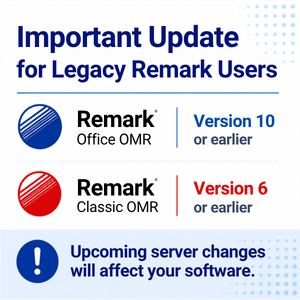
As part of these changes, Gravic’s servers can no longer support older communication protocols used by legacy versions of Remark Office OMR (version 10 and earlier) or Remark Classic OMR (version 6 or earlier).
If you are currently using Remark Office OMR v10 or Remark Classic OMR v6 or earlier, these upcoming changes may affect your software. We recommend contacting the Remark Team or your local Remark dealer to discuss your current version and available upgrade options.
Upgrading to the latest version of Remark Office OMR v12 or Remark Classic OMR v7 helps ensure that you are using a version designed to work with today’s technology while also giving you access to the latest Remark Office OMR features and improvements.
Stay current
Remark Office OMR v10 and Remark Classic OMR v6 were designed for the standards of the mid 2010s. Use a modern version of your Remark product designed for today’s operating environments and technology standards including Windows 11.
The latest features and improvements
Take advantage of the newest functionality, usability enhancements, and product updates available in your Remark product. There have been many new features added over the years. In particular for Remark Office OMR users, features such as anchor marks, ICR, and the AI Assistant help you get more from your forms and help provide accurate and actionable data quicker and easier.
Gets you back on software maintenance and support
You get one year of software maintenance and support with the purchase of an upgrade. This gives you all updates and upgrades to the software as well as access to our award-winning support team to answer any questions you have on the products.
If you are using Remark Office OMR v10 or Remark Classic OMR v6 or earlier, contact the Remark Team or your local Remark dealer to learn more about your upgrade options and determine the best path forward for your organization. If you want more information and to be contacted, please fill in the form below or contact the Remark Team.
Share This
What Now?